TL;DR
- Automation in a services firm pays off in a fixed order, and firms that start with client-facing automation before internal admin almost always regret it
- Ready-made Australian platforms sit at $75 per user per month on the entry tier and $125 where quoting, invoicing and timesheets live, plus $350 once to configure the account
- The largest recoverable time sink in most small firms is not delivery work. It is chasing status and chasing payment
- Anything holding client personal information falls under the Australian Privacy Principles, which is a design constraint rather than a footnote
Short version: automate the admin nobody wants credit for. Leave the client relationship alone until the admin is boring.

There is a version of professional services automation that sounds impressive and does nothing. Automated client emails, an AI writing proposals, a dashboard nobody opens. Six months in, the firm is doing the same manual work it always did, with a subscription on top.
The version that works is duller. It starts with tasks that are repetitive, internal and invisible to clients, because those are the ones where a mistake costs nothing to fix and the time saved is real.
Start with what leaks, not with what impresses
Before picking software, spend a week noticing where the unbilled hours go. In most small firms the pattern is consistent.
| Time sink | Roughly what it costs | Automatable? |
|---|---|---|
| Assembling a status update by hand | An hour a week per senior person | Yes, almost entirely |
| Chasing an unpaid invoice | Fifteen minutes a time, repeatedly | Yes |
| Working out what was quoted versus delivered | Half a day at month end | Yes, if quoting and delivery share a system |
| Re-explaining a client’s history to a colleague | Unmeasured and constant | Partly |
| The actual advice work | The thing you sell | No, and do not try |
That last row matters. Firms that automate into the delivery layer end up producing generic work faster, which is a worse business than producing good work slowly.
The platforms built for this shape
The category usually gets sold as professional services automation. In practice it is a CRM with time, quoting and billing attached. Australian buyers can compare packaged options against a general-purpose CRM plus bolt-ons, and the packaged route is normally cheaper by the time you have paid for the third integration.
The Serv-U business services CRM is one of the ready-made builds in this market, at $75 per user per month on Professional and $125 on Enterprise, both excluding GST, with $350 up front per account. It is assembled on Zoho CRM by a partner of eight years rather than written from scratch, which is worth understanding as a buyer. You inherit a mature underlying platform and a configuration layer somebody else already argued about.
A quick overview of how one of these builds hangs together beats a specification sheet.
Video: Serv-U Overview Streamline Your Client & Job Management (watch on YouTube).
The order that works
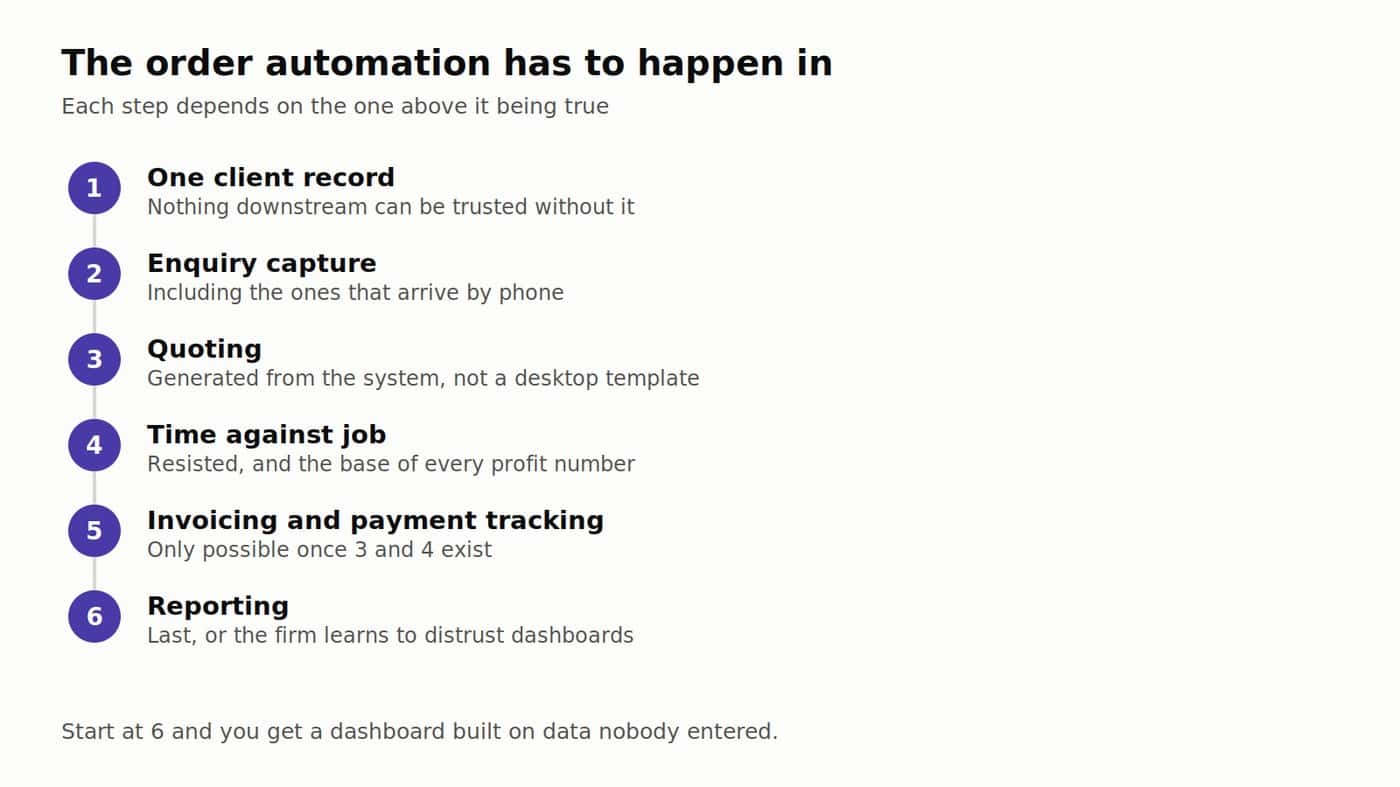
Switch things on in this sequence and each step makes the next one possible.
- One client record, because everything downstream depends on a single place where a client’s history lives. Until that exists, nothing you automate can be trusted.
- Enquiry capture, so every new enquiry lands in the system automatically, including the ones that arrive by phone. This is where most firms lose track and it is the cheapest fix.
- Quoting from the system rather than a template on someone’s desktop, so what was promised is retrievable a year later.
- Time booked against the job. Boring, resisted, and the base of every profitability number you will ever want.
- Invoicing and payment tracking, which only becomes automatable because steps three and four exist.
- Reporting, last, because a dashboard built on incomplete data teaches the firm to distrust dashboards.
Skipping to six is the classic mistake. It is also what most demos encourage, because dashboards demonstrate well.
Client data is a design constraint
The moment a system holds names, contact details and file notes about people, the Australian Privacy Principles govern how that information is collected, used, disclosed and secured. They are deliberately not a checklist, which means the decisions sit with you and get harder to unwind the longer you leave them.
Three of them belong in the configuration rather than a policy document written afterwards. Who sees full client records versus a restricted view. What happens to an enquiry that never became a client. And whether the free-text notes field is somewhere you would be comfortable having read back to you.
Voice automation raises the same question more sharply. A Retell AI agent answering calls and writing them into the client record is a real relief for a firm losing enquiries to voicemail. It is also a system capturing what people said about their circumstances, and it needs the same access thinking as everything else.
Judge the partner, not just the product
Implementation quality decides whether any of this survives contact with a real firm, and the useful signals are the ones you would apply to hiring any professional adviser. There is a good general list of questions worth asking an accountant before you hire one, and most of them transfer directly. How do you charge. Who actually does the work. What happens when something goes wrong. Can I speak to a client like me.
The honest measure of whether it worked
Not the dashboard. Ask three people in the firm to tell you, without opening anything, what stage the five largest jobs are at.
If they can, the system is being used. If they reach for a spreadsheet, you have added software to a firm that still runs on memory, and the next subscription will not fix that either.